HOUSING.COM | JAN 2026-JUL 2026
From reactive to built-in: fixing image quality at Housing.com
An end-to-end audit of how a property photo travels from a broker's phone to a buyer's screen, and a strategy to build quality in from the first upload.

ROLE
TIMELINE
Context
TL;DR:
Buyers judge a listing by its photos first, and on Housing.com those photos were often dark, blurry or awkwardly cropped. I traced a single image through the whole pipeline (upload, verification, optimisation and rendering) and found that quality was only checked at the very end. My three-part strategy, Prevent, Preserve, Present, proposed to build quality in from the start. Two recommendations, a guided upload flow with guardrails and standardised rendering ratios, were prioritised to be picked up first.
/ THE PROBLEM
Before a buyer requests a call, they scroll. A listing gets a few seconds of attention, and the photos do most of the talking in that time. Many Housing.com listings were losing that moment.


/ THE REFRAME
Picture a broker in an empty flat, carefully clicking every room. Before those photos reach a buyer, four different systems check, compress, resize and crop them, and any one of them can quietly undo that effort. So I stopped judging photos and followed one all the way through.
/ 4 stages, 4 user groups; [no single owner of the end-to-end experience]

Upload (Owner/broker, Design) > Verification (DQ team) > Optimisation (Engineering) > Rendering (Product / Design)
/ FOLLOWING THE IMAGE
// 01 UPLOAD
5 upload entry points
Five ways in, five different sets of rules.
One flow locked orientation and room order. Another had no rules at all.

// 02 VERIFICATION
A strong audit, running too late.

// 03 OPTIMISATION
Variants, but no rules.
A sharp original could reach buyers as a blurry thumbnail.

// 04 RENDERING
39 ratios for one photo?
Up to five on the home page alone. The same photo looked different everywhere.

/ THE INSIGHT
Each stage worked on its own. But because nothing guided a photo at upload, every stage after it was cleaning up. The audit rejected, reviewers checked by hand, and rendering cropped whatever arrived. The fix wasn't a stricter filter at the end. It was moving quality to the beginning.
/ THE STRATEGY
Stop bad photos at the source, Protect good ones on their way through and show every photo the way it deserves to be seen
Prevent: the guided upload
Instead of finding out after review, brokers now get guidance right beside the upload box and feedback the moment a photo lands. A dark photo is flagged on the spot, along with how to fix it.
STEP 1:
Room coverage, clear limits, instant feedback do/avoid panel, missing room nudge.

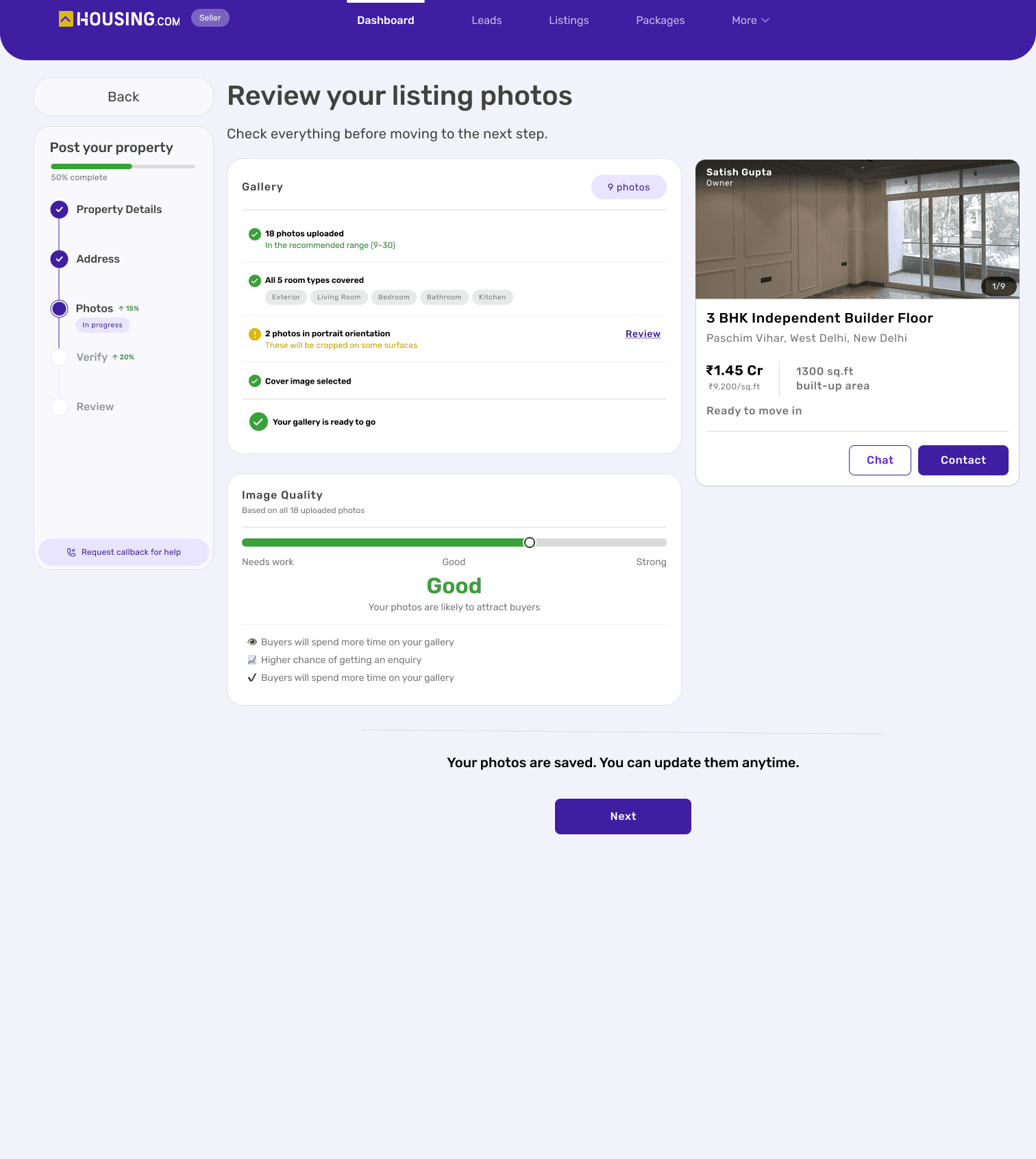
STEP 2: The checklist, the quality meter, the live listing-card preview.
Preserve: the variant rules
A clear rule for which variant serves which slot, so compression stops softening photos that started out sharp (Recommended for a later phase)*
Present: the rendering rulebook
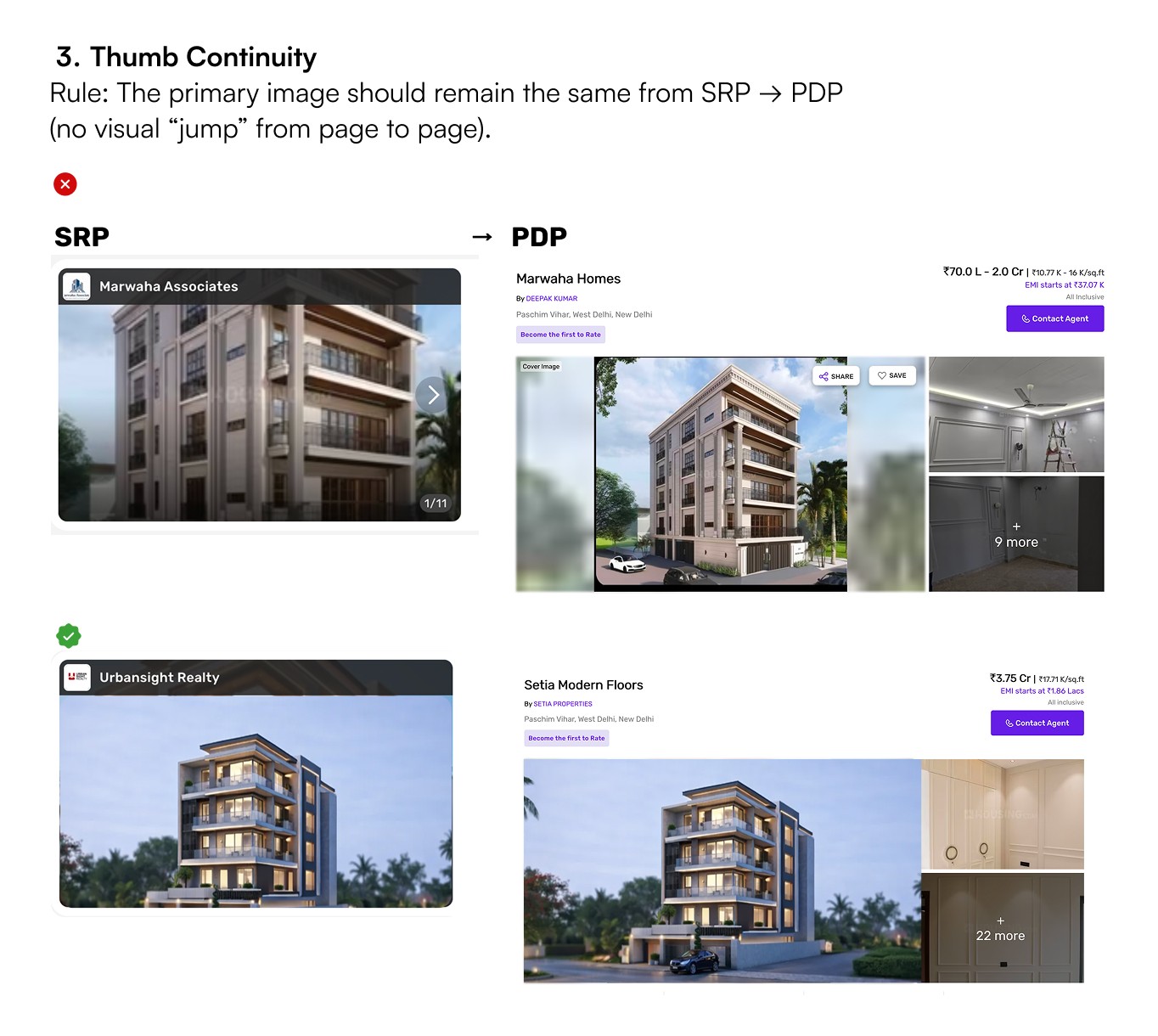
I wrote the rules for how every listing photo is framed: three standard ratios, crop rules that protect what buyers look for, and a cover photo that stays put from search results to the property page.
Three ratios. No ad-hoc exceptions.


Never crop the roofline. Keep the floor and ceiling in frame.
Three ratios. No ad-hoc exceptions.